This post is also available in:
 English
  polski (Polish)
How to Test Your App on a Slow or Unstable Internet Connection (Windows)
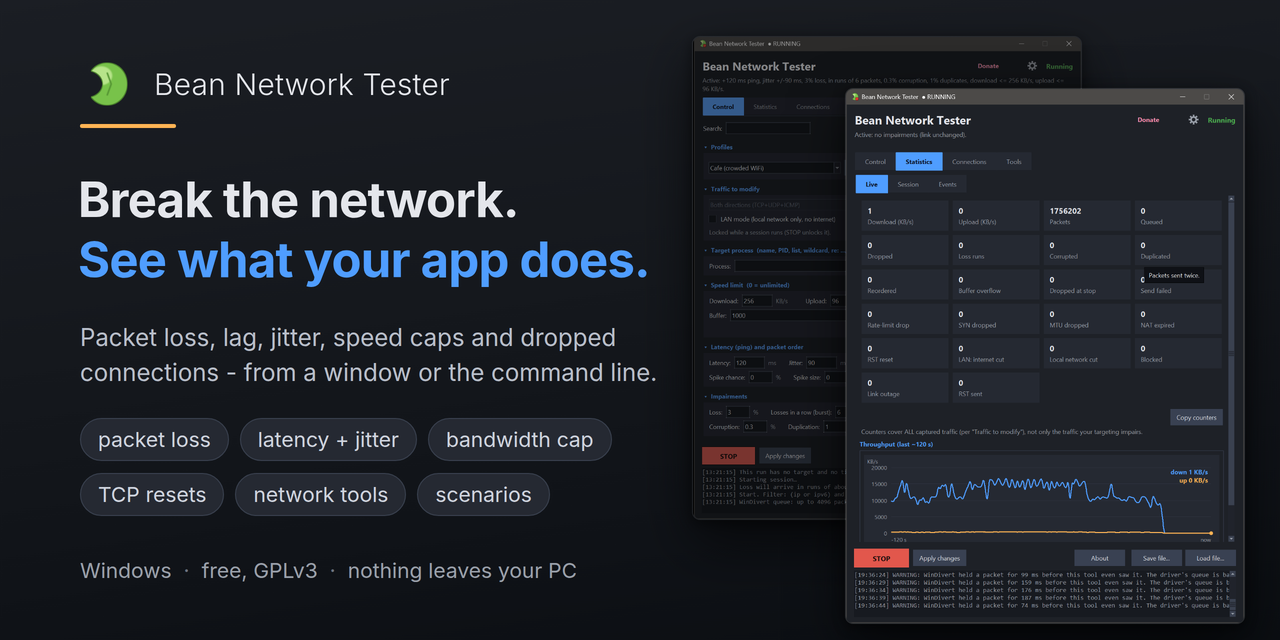
Hello, if you want to test your Windows app in poor network conditions, you can use “Bean Network Tester.” All things from this post can be done from the GUI or CLI, the tool is open source, 100% free for commercial use.
1. Instalation.
You can get the .msi or .zip from GitHub (please give it a star)
Or install it from package managears:
winget install -e –id DonislawDev.BeanNetworkTester
choco install bean-network-tester
*To use the app, you will need admin rights
2. How to Simulate LTE/3G network or crowded WiFI + more
By design Bean Network Tester will target “ALL NETWORK TRAFFIC”, so be sure to set a specific target. The fastest setup is:
- Select the “Profile” that you wish to use
- Write “Target process”
- Click the “Start” Button

This way you can easily test your app in few clicks, each profile comes with own stats like: “Loss, Losses in a row (burst), Latency, Jitter Download,Upload limit” and more.

You can see the full list of profile stats and CLI parameters here
Tip:You can also target by IP or ports:

3.More “advanced” use
The app comes with premade profiles, but you can create your own profiles or settings files, you can experiemnt with with tons of things, let’s say you want to check how the app will behave during TCP_Sync drop or TCP_reset:

This way you can customize the app for your own testing and share the profiles with your team
4. Scenarios system
At the bottom of the app, you can see the “scenarios”:

there are few premade scenarios (click “Load Scenario…”)

They are just .json files that you can add or edit:
“{
"loop": true,

"steps": [

{ "at": 0, "settings": { "filter": "udp", "dst_port": "53", "latency": 10, "jitter": 5 } },

{ "at": 15, "settings": { "loss": 25, "latency": 200, "jitter": 200 } },

{ "at": 35, "settings": { "loss": 60, "latency": 750, "jitter": 500 } },

{ "at": 55, "settings": { "loss": 100 } },

{ "at": 68, "settings": { "loss": 10, "latency": 100, "jitter": 80 } },

{ "at": 85, "settings": { "loss": 0, "latency": 10, "jitter": 5 } }

]

}
”
You can also create your own scenarios, let’s say at 90 second, we would like to reset_tcp, we could just add:
“{ "at": 90, "action": "reset_tcp" },”
5. END
The tool is a lot more advanced, You can see all network options here, but that’s not all, because the app comes with a few useful things. There is a “connections” tab in which you can see download/upload stats, packets, and connections.

And there is a “tools” tab in which you can check which ports are being used + active connections without running the packet capture:

In this post, I didn’t get into the technical details of burst, tcp/udp or WinDivert which is used in Bean Network Tester, it’s mostly a quick start, but if you want to use the app in more “advanced” cases, then it’s always an good thing to know a few things about networking.
Please, don’t ask me about adding “UDP reset” 🙂
*I’m the author of the tool
What you can simulate
Real networks fail in more ways than “slow”. Bean Network Tester lets you recreate all of them:
- High latency and jitter – the lag and unpredictable delay of mobile or long-distance connections.
- Packet loss – the dropped data behind stalls, retries and timeouts.
- Bandwidth limits – a genuine 3G or DSL-speed cap on upload and download.
- Corruption, duplication and connection resets – the weird, rare failures that crash code nobody tested for.
If you are QA engineer, game developer, software tester, game tester <anything else> you can simulate poor network conditions with Bean Network Tester,
Why this tool name is “Bean Network Tester”? That’s simple, I had created this tool with AI-Assisted workflow, but from a small project, it grown to a bigger one, but the tool is 100% free, and testing, support, marketing, development costs a lot of time + cash for AI tokens, so in next few months I will have to eat beans as a dinner. So if you like the tool, please
Consider Donation
*Nah, to best honest I just love beans :D, no bean have been hurt during the development of this tool. In future I will bring a full documentation to the tool.
Follow me on: